ListingMap on Rightmove
Turn any Rightmove listing into one clear page with Reveal, see what's nearby, shortlist as you browse the results page, and see the true monthly cost of an England rental, all without a second tab.
A Rightmove listing tells you the price, the bedrooms, the floorplan. It says nothing about how far the flat actually is from your office, the nearest gym, or your parents' house. Most people end up with two tabs open: Rightmove in one, Google Maps in the other, copying the address across every time they check a new listing.
ListingMap removes the second tab. It reads the coordinates Rightmove already has on the page, the same ones behind Rightmove's own map, and adds a button right next to that map, so the answer is one click away on the listing you're already reading.
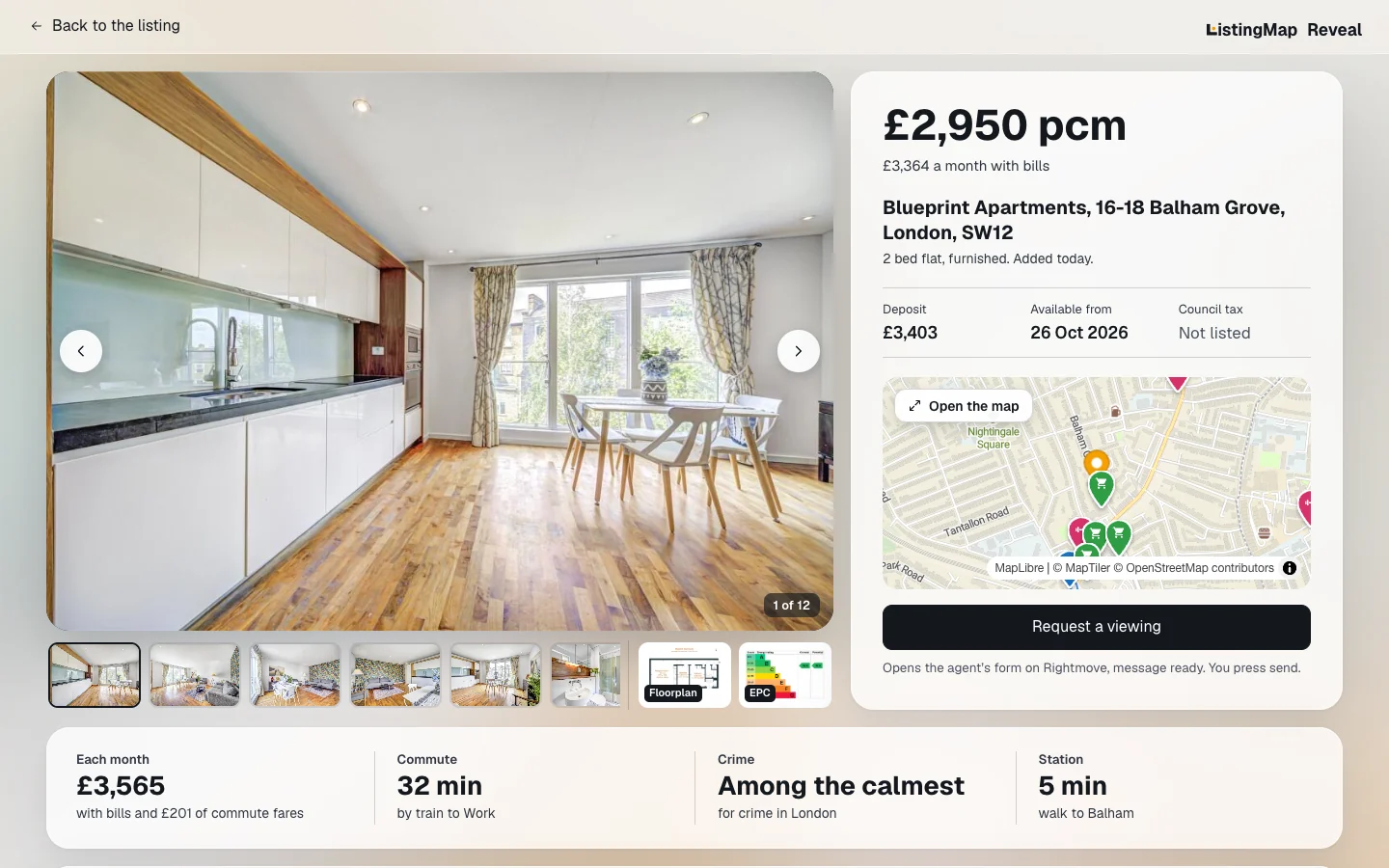
Next to that button sits Reveal. One click lays the whole listing out on a single page: big photos first, with the floorplan and the EPC chart pinned in the photo strip, every fact in one list, what the home really costs a month, a live map, your commute stop by stop, recorded crime nearby and what locals say about the area. Request a viewing opens the agent's own Rightmove form with your message already written in, and Back to the listing puts you straight back where you were.
It also works on Zoopla and OnTheMarket, if you're checking the same street across more than one site, but Rightmove is where the button, the results-page controls and the floor-size chip were built and tested first, against real listings, not a mock-up.
On a Rightmove rental in England, ListingMap goes a step further: a Costs tab works out the true cost of living there, not just the advertised rent. Council tax comes from the gov.uk rates table for that billing authority, energy from the property's own Energy Performance Certificate where one exists, priced at the current Ofgem price cap, and water from the local water company's average bill. A 1 adult / 2 adults control scales all three, since the council tax discount and typical energy and water use both depend on it.
On a Rightmove listing
- 1
Press Reveal
A Reveal button sits beside the Nearby button and floats at the bottom right as you scroll. One click turns the listing into one clear page, and you can set every listing to open that way from the ListingMap icon in your toolbar.
- 2
Find the Nearby button by the map
ListingMap adds a Nearby button right after Rightmove's own map, in the same spot every time.
- 3
Open it without leaving the page
A panel opens over the listing with real travel times to your saved places or any category you tap.
- 4
Expand it or close it
Pop the map into its own tab, or close the panel and you're straight back on the listing.
- 5
See the true monthly cost
On an England rental, a Monthly chip floats on the map itself, next to the panel. Tap it to open the Costs tab: rent plus council tax, energy, water and your commute, each line showing where its figure comes from.
On Rightmove's search results
- 1
A Nearby button on every card
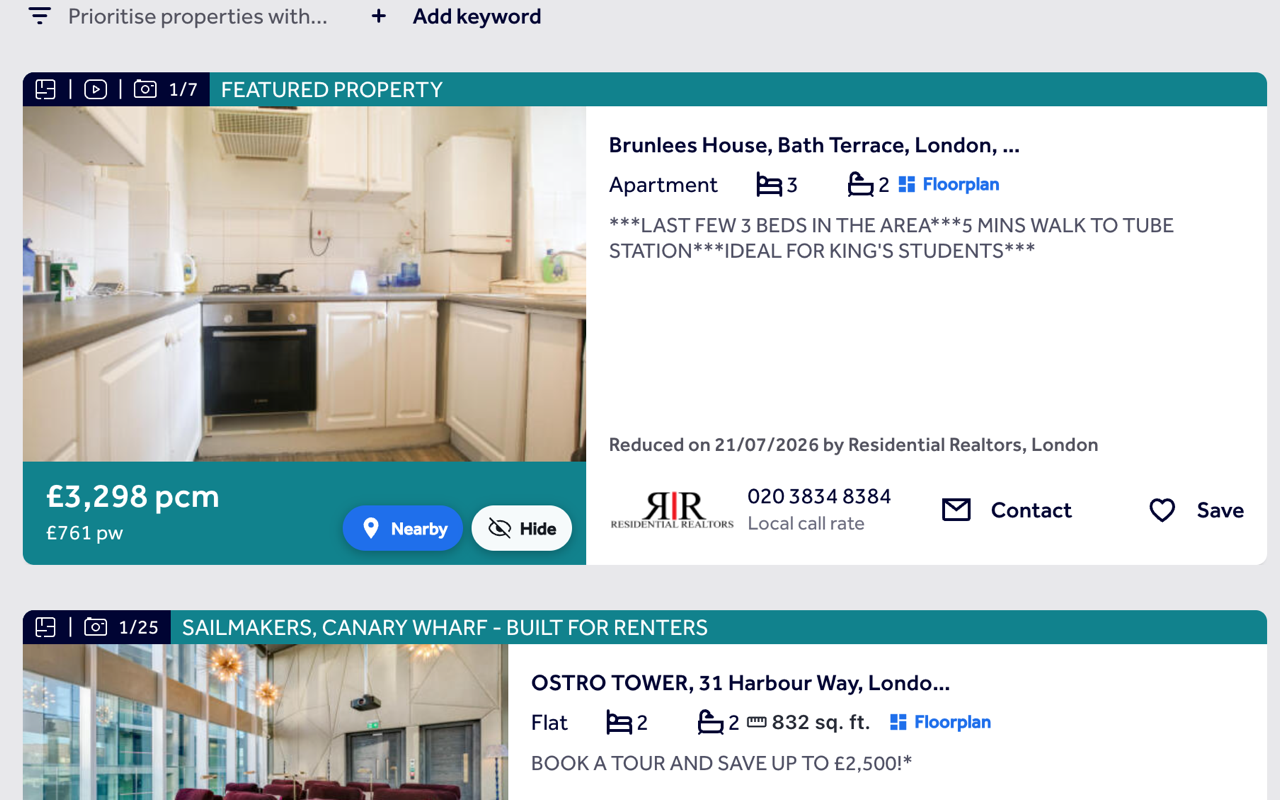
Every card on Rightmove's results pages gets its own Nearby button, reading the same data Rightmove already loads.
- 2
Reveal from the results
Every card also gets a Reveal button, so you can open the one-page view without clicking into the listing first.
- 3
Hide what you've ruled out
Tap Hide and a home disappears for good, with a panel to review and restore anything you've hidden.
- 4
Floor size, before you click
Where Rightmove has it, the floor area and a floorplan link show right on the card.
Common questions
What does Reveal show on a Rightmove listing?
Everything on the listing, laid out on one page: big photos with the floorplan and EPC a click away, every fact in one list, and the agent's description. It adds what the listing leaves out: what a rental costs a month with council tax, energy and water, a live map with walk times to the station, shops and the gym, your commute stop by stop, recorded crime within a mile, and what locals say about the area.
Can every Rightmove listing open in Reveal automatically?
Yes. Click the ListingMap icon in your browser toolbar and turn on Open listings in Reveal. After your first Reveal, the page also offers to do it for you. Back to the listing always takes you to Rightmove's own page.
Does ListingMap work on Rightmove's map search as well as the list view?
Yes. The Nearby and Hide buttons appear on cards in both find.html and map.html, and hiding a home in one view carries over to the other.
Where exactly does the button appear on a Rightmove listing?
Right after the map section, in the same place Rightmove puts its own map link. If a listing loads slowly and the map hasn't rendered yet, ListingMap shows a small floating button until it can move into place.
Does the floor size shown match what's on Rightmove?
Yes. It's the same figure from the same listing data Rightmove itself uses, not a separate estimate.
Do I need to sign in to use it on Rightmove?
No, hidden homes and travel times both work without an account. Signing in is only there to keep your saved places and hidden homes synced if you use more than one device.
Will it slow down Rightmove or change how the page looks?
No. ListingMap only adds a button, and, when you open it, a panel over the page. It doesn't touch Rightmove's own layout, listings or search results.
What happens if Rightmove changes its page layout?
ListingMap watches the page and re-adds the button if a Rightmove update moves things around or re-renders the listing, for example after you open and close the photo gallery. You shouldn't need to reload the page for it to reappear.
Can I check a different street than the one on the Rightmove listing?
Yes. Drag the map inside the panel and use "Search this area" to re-run a category around wherever you've moved to, without leaving the listing or starting a new Rightmove search.
How does ListingMap work out the monthly cost on a Rightmove listing?
It adds the rent from the listing to council tax priced from the gov.uk 2026-27 table for that billing authority, energy priced at the current Ofgem price cap using the property's own Energy Performance Certificate where one exists, and the local water company's average bill. It only covers rentals in England for now, and every figure is an estimate, not a quote.
What if a Rightmove listing doesn't state a council tax band?
Some listings show the band as TBC. When that happens, ListingMap shows a band picker so you can choose one and see the cost for that band straight away, instead of leaving the row blank.
Also works on
United Kingdom
United States
Canada
Australia
See what's nearby, every time you open Rightmove.
Add it once and it follows you to every Rightmove listing and every search, with the same saved places and hidden homes right there on the page.
Install on your browser, free